
Are your prints shifting like in the photos below?
If yes, this is most likely because something is preventing the motors on the XY plane to correctly move. Usually this means there is some type of resistance on the extruder, most often caused by the extruder not being able to pull the filament roll. There are a few potential troubleshooting solutions that you can try!
- First, please make sure the black wire at the top of the printer is not tucked into the side of the case. We tuck the wire into the side of the case to make for easier shipping, but if this wire is tucked into the case while printing, it can prevent the nozzle from reaching it's home position correctly. This usually results in a grinding sound, as well as various print quality issues such as shifting. Please see the image below:

- Please try multiple different spools of printer food if you have them available to ensure that it's not a bad roll
- Make sure the spool of printer food is able to rotate freely and there isn't any unnecessary tension on the food while printing. You want the printer food to have a nice smooth arc from spool to printer head. The printer food should not be touching or catching on the metal frame at all. Any tension on the food can cause shifting, globbing, and generally weaker prints, so make sure your food is always loose! If you're noticing that there is tension on the printer food, you can try flipping the spool to the other side and see if that helps!
- Check your individual spools of printer food to ensure they are not tangled. The roll should be wound neatly with no pieces overlapping and no knots. If you notice a tangle in your printer food, you can attempt to re-roll it if you're up for it. However, any Toybox brand filament should be wound properly, so feel free to reach out to us with a photo and we can replace the roll for you!
- Shifting could also be happening because there is friction on the extruder. Try adding lubricant on the top and sides of the plastic beam pictured below. After applying lubricant, slide the extruder back and forth to spread out the lubricant and make sure it is reducing the friction. You can use any general household lubricant, like wd40.
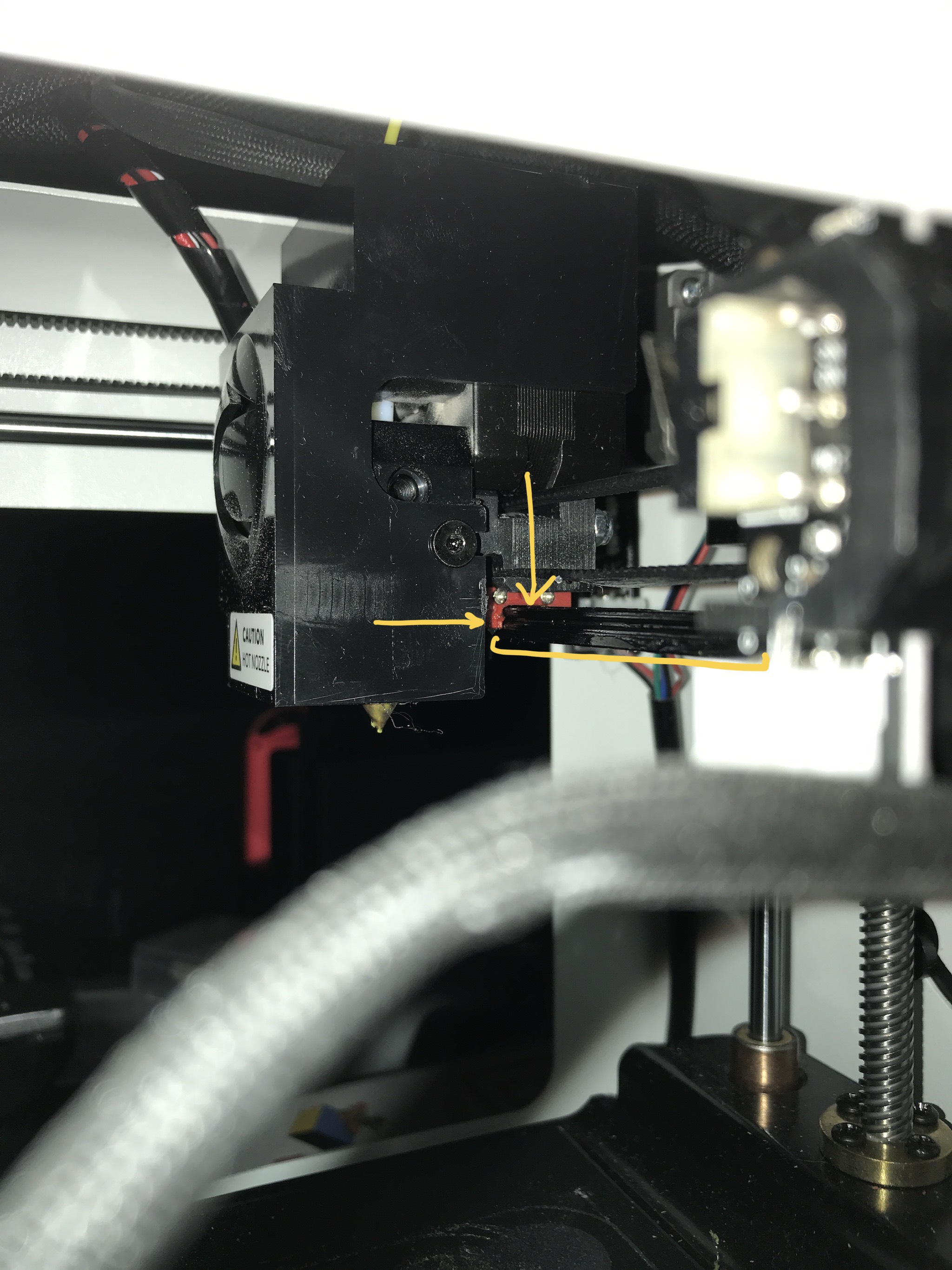 .
. 
- Lastly, tightening the print belt could also fix the shifting. To adjust your print belt, you can click here to follow a short instructional video.
If you're not able to resolve the issue or need any assistance with troubleshooting, please feel free to reach out to us at support@toybox.com with some photos as well as a description of what troubleshooting you've attempted so far and we'll be happy to help you out!
Comments
3 comments
@BenC how do you create a custom/edit to the design? I know how to create my own design, but how do you take one that you purchased or selected from the toy box "explore" section and edit it?
There are limits - I think the fancy, purchased items may not let you edit. But for most, if you click into the toy, then press the Pencil icon at the top, that will let you edit and save new versions.
i solved this problem by pulling the black cable up through the top of the box. it was kind of wedged inside the box for shipping
Please sign in to leave a comment.